Instagram is one of the most widely used social media platforms for communication, sharing posts, and connecting with friends. By default, Instagram shows your activity status, such as whether you are Active Now, Active Today, or Last Active, along with a small green dot beside your username when you’re online. While these features help others know when you’re available for chatting, they’re not ideal for everyone. Many users value privacy and prefer to browse content quietly. BoostigStore understands this need and provides helpful guides for managing your Instagram settings. This complete.
Step-by-Step How to Appear Offline on Instagram
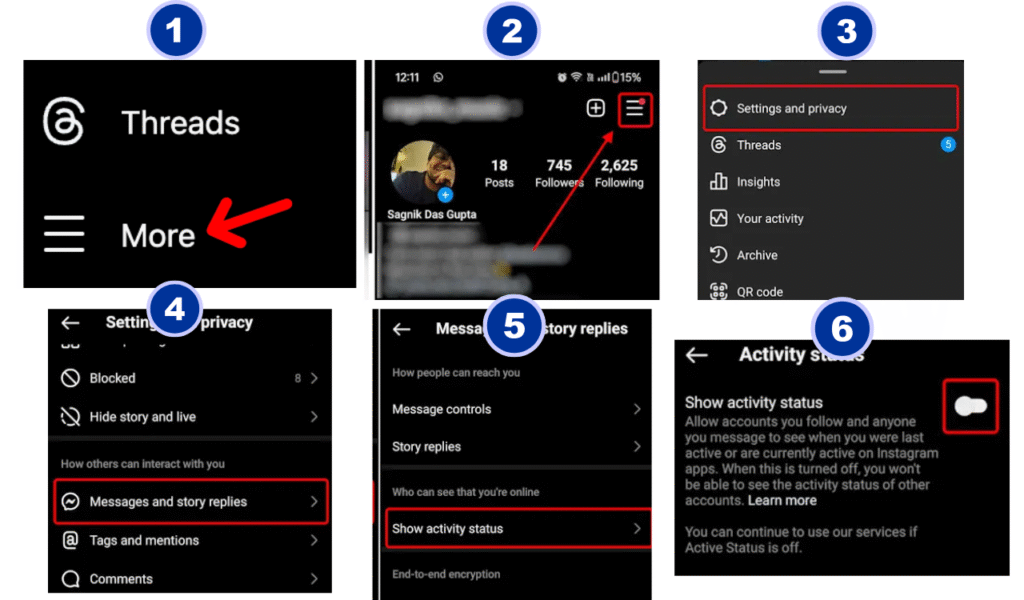
Want to appear offline on Instagram but still scroll in peace? Here’s a simple step-by-step guide to help you hide your activity status easily. Open the Instagram app and go to your profile. Tap the three lines in the top-right corner and select Settings and Privacy. Next, go to Messages and Story Replies, then tap Show Activity Status. Turn the toggle off to appear offline. This means no one will see when you were last active or currently online. You can still message and browse freely without alerting anyone. Whether you want privacy or just quiet time, this quick setting keeps your Instagram use completely private and under your control.
Appear Offline on Instagram (iPhone & Android )
Appear Offline on Instagram (Android)
Open Instagram on your Android phone and tap your profile icon at the bottom right. Go to Settings and Privacy → Messages and Story Replies → Show Activity Status. Toggle it off to appear offline instantly.
Appear Offline on Instagram (iPhone)
To appear offline on Instagram using an iPhone, open the Instagram app and go to your profile. Tap the three lines (☰) in the top-right corner, then select Settings and Privacy. Scroll down to Messages and Story Replies, and tap Show Activity Status. Turn off the toggle to hide your online status and last active time. Now, you can browse Instagram privately without others knowing when you’re online.
How to Appear Offline on Instagram Using a Desktop Browser
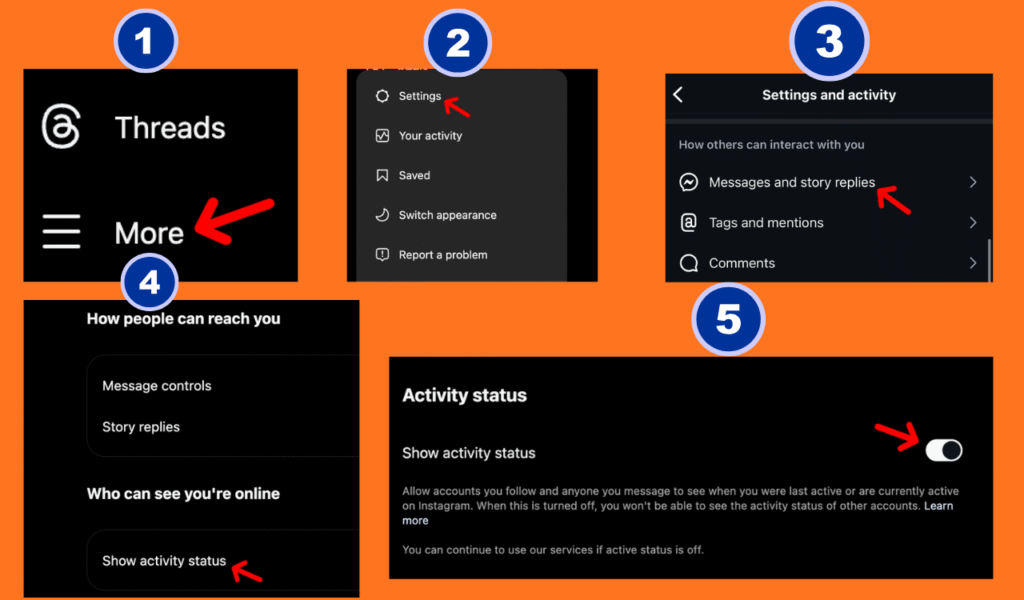
If you use Instagram on your computer, you can easily appear offline through your desktop browser. Open Instagram and log in to your account. Click on your profile picture in the top-right corner, then select Settings from the dropdown menu. Next, go to Privacy and Security. Under the Activity Status section, uncheck the box that says Show Activity Status. This simple step will hide your online presence and last active time from others. You can now browse, like, or message freely on Instagram without anyone knowing you’re currently active online.
How to appear offline on Instagram chat
If you want to appear offline while chatting on Instagram, it’s easy to do. Open your Instagram app, go to your profile, and tap the three lines (☰) in the top-right corner. Select Settings and Privacy → Messages and Story Replies → Show Activity Status. Turn off the toggle to hide your online and last active status. Once disabled, your friends won’t see when you’re active or typing in chat, giving you complete privacy while messaging.
Can You Appear Offline to Some People Only?
Instagram currently doesn’t allow users to appear offline to specific people only. When you turn off your Activity Status, it hides your online presence and last active time from everyone, not just selected followers. However, you can restrict or mute specific accounts to limit interactions without blocking them. This gives you more control over your privacy. While you can’t choose who sees you offline, using these settings helps manage who engages with you on Instagram.
Does Appearing Offline Affect Your Messaging?
Appearing offline on Instagram does not affect your ability to send or receive messages. You can still chat, reply, and share content as usual. The only difference is that others won’t see when you’re online or when you last used the app. Your messages will still be delivered instantly, and you’ll continue to get notifications. This feature simply hides your activity status, allowing you to stay connected privately without showing your active presence to others.
Benefits of Appearing Offline on Instagram
Appearing offline on Instagram gives you more privacy and peace. When you turn off your online status, people can’t see when you are active or last seen. You can check posts, send messages, and scroll freely without anyone knowing. It helps you avoid unwanted chats and focus on what you enjoy. This feature is great for those who want to use Instagram quietly and stay in control of their time and activity.
Conclusion
Appearing offline on Instagram is simple, effective, and accessible through your privacy settings on both mobile and desktop devices. By disabling your Activity Status, you gain control over your online visibility and browsing habits. Whether you want to reduce distractions, increase privacy, or simply navigate the platform more comfortably, turning off the activity indicator allows you to use Instagram on your own terms. Although there is no way to selectively hide your status from specific users, hiding your Activity Status entirely is the most reliable method to ensure privacy across your account.
Frequently Asked Questions About Appearing Offline on Instagram
Is there a way to appear offline on Instagram?
Yes, you can appear offline on Instagram by turning off your Activity Status in the Settings and Privacy section.
How do I turn on ghost mode on Instagram?
Turn off your Activity Status in Settings and Privacy to hide your online presence and appear in ghost mode.
Can you appear offline on Instagram?
Yes, by disabling the Show Activity Status option in Settings, you can appear offline and browse privately anytime you want.
Does Instagram show when someone is online?
Yes, Instagram shows a green dot beside a user’s name when they are online or active in direct messages.
Is there a way to appear offline on Instagram?
Yes, open Settings → Privacy → Activity Status, and turn it off to hide your online activity from everyone.