TikTok has quickly become one of the most popular social media platforms in the world, allowing users to share short videos, grow communities, and express their creativity. But with all that sharing comes a question many users ask: how can you control your privacy on TikTok, especially when it comes to profile views?
If you’ve ever wondered who’s been checking out your TikTok profile or you’d prefer to browse others’ profiles without being seen, this guide will help you understand exactly how to turn off profile views on TikTok, what happens when you do, and how it affects engagement. We’ll also explore related topics, such as what counts as a viral video and how much TikTok actually pays per view.
For creators and influencers looking to grow faster, BoostingStore offers trusted growth tools and insights to help you increase your reach safely and effectively. Managing privacy while boosting engagement is key to a strong TikTok strategy.
By learning how to balance visibility, privacy, and audience interaction, you can enjoy the best of both worlds—staying secure while maximizing your TikTok potential.
What Is the TikTok Profile Views Feature?
TikTok’s Profile Views feature lets users see who has visited their profile within the past 30 days—and, in turn, it also allows others to know when you’ve viewed their profiles. Think of it as a two-way street: if you can see who’s visited your page, they can also see that you visited theirs.
While some creators enjoy this feature because it helps them identify curious followers or potential collaborators, others prefer more privacy. If you fall into the latter group, TikTok gives you full control to switch the feature off at any time.
How to Hide Your Profile Views on TikTok Easily
Adjusting your TikTok settings gives you full control over who can see your profile activity. To begin, open the TikTok app and tap the Profile icon located in the bottom right corner of your screen.
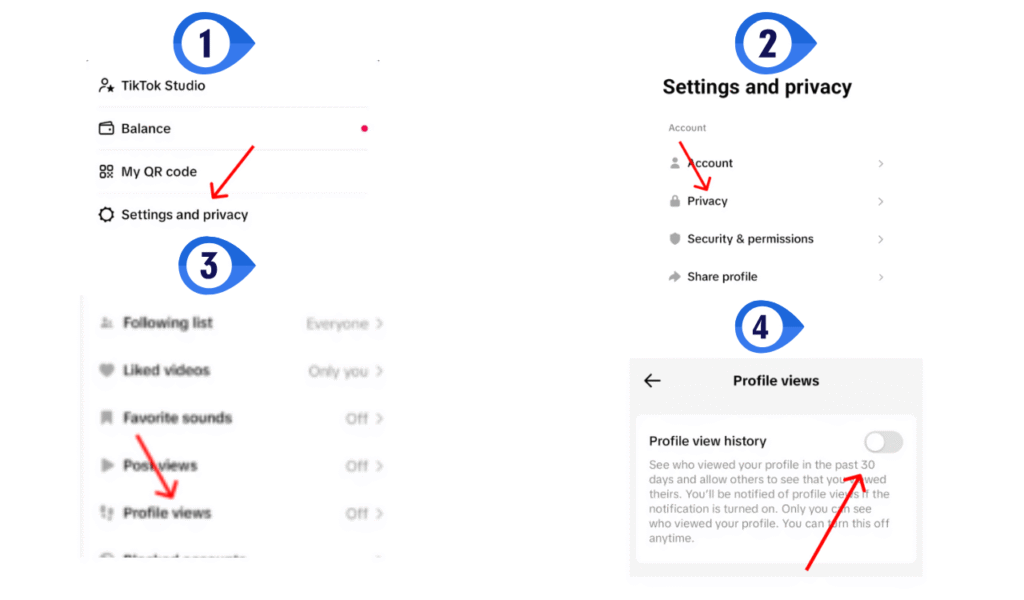
Next, tap the Menu icon (☰) in the top-right corner of your screen. From there, choose Settings and privacy, then select Privacy. Scroll down to find the Profile views option, shown with a footprint icon. Finally, turn off Profile view history to stop TikTok from tracking or showing who visits your profile.
On the Profile Views Page
Business owners who track their TikTok analytics can easily manage privacy settings through the Profile Views page. Go to your profile and tap the Profile Views button at the top of the screen.
Next, tap the Settings icon to adjust your visibility preferences. This quick method fits naturally into your regular performance checks, helping you save time while keeping your professional activity private and secure.
How to turn off notifications on TikTok
To turn off notifications on TikTok, open the app, go to Settings and privacy, and tap Notifications. From there, toggle off the alerts you don’t want, helping you stay focused without constant pop-ups or distractions.
Does Turning Off Profile Views Affect Engagement?
Turning off profile views on TikTok does not affect your likes, comments, or video views**. This setting only hides who can see that you visited their profile. If you turn it off, people won’t know you looked at their page, and you also won’t see who checked yours. Sometimes, when people see that you visited them, they visit your page too, which can bring more engagement. But if you prefer privacy, turning it off is a good choice. So, don’t worry, turning off profile views won’t stop your TikTok videos from growing or reaching more people.
How Many Views Are Considered Viral on TikTok?
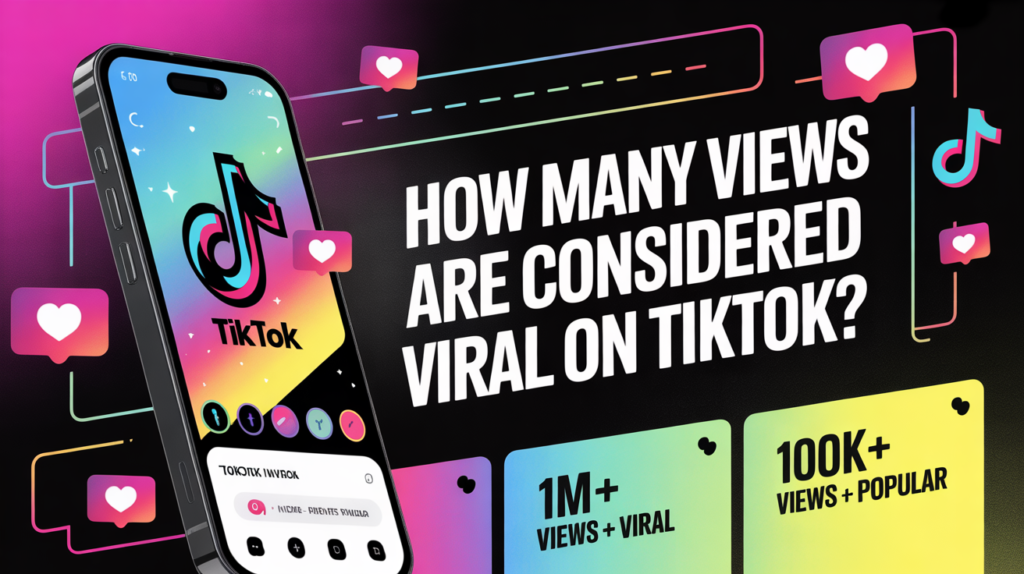
There’s no exact number that makes a TikTok video go viral, but generally, videos with 100,000 views or more are considered viral for small creators. For larger accounts, hitting 1 million views usually marks viral status. What really matters is how quickly the views grow, how much engagement you get through likes, comments, and shares, and whether your content reaches people beyond your followers. Consistent interaction and creativity increase your chances of going viral.
How Much Money Is 1,000 Views on TikTok Worth?
The amount of money you can earn from 1,000 views on TikTok depends on your location, engagement, and participation in TikTok’s Creator Rewards Program. On average, TikTok pays between $0.02 and $1 per 1,000 views. Under the older Creator Fund, earnings were quite low, but the newer rewards system offers better payouts for high-quality content. However, most creators make more money through brand deals, sponsorships, or affiliate marketing rather than direct TikTok payments. The more engaging and viral your videos are, the greater your overall earning potential.
Can You See Who Viewed Your TikTok Videos Anonymously?
Many users also ask, “Can I see who watched my TikTok videos anonymously?”
Unfortunately, TikTok doesn’t let you see every individual who viewed your videos. You can see total view counts and engagement stats, but not specific usernames—unless TikTok activates certain limited “post view history” features for your account.
That means if someone watches your videos without interacting, you won’t know who they are. The Profile Views feature only tracks visits to your profile, not your videos. So, even if you turn it on, you won’t see everyone who watched your videos—only those who looked at your profile page
How to Reset TikTok Algorithm
If your TikTok feed no longer shows content you enjoy, you can easily reset the algorithm. Start by clearing your watch and search history in the Settings and privacy section. Next, unlike videos you’re no longer interested in and tap “Not interested” on unwanted content. Finally, interact with new videos, creators, and hashtags you like. This helps TikTok relearn your preferences and refreshes your For You Page with content that matches your current interests.
Is it safe to buy from tiktok shop?
Buying from TikTok Shop is generally safe, as the platform verifies sellers and uses secure payment methods. However, it’s important to check seller ratings, product reviews, and return policies before purchasing. TikTok also offers buyer protection for refunds if orders don’t arrive or match the description. Still, avoid deals that seem too good to be true and only buy from trusted or verified sellers to stay safe while shopping on TikTok.
TikTok Shop Requirements

To join TikTok Shop, sellers must meet basic requirements: be at least 18 years old, have a valid ID, and provide business or tax information. You’ll also need a TikTok account in good standing and a linked bank account for payments. Meeting these requirements allows sellers to list products, manage orders, and earn directly through TikTok Shop.
Final Thoughts
TikTok thrives on creativity, connection, and visibility—but that doesn’t mean you have to sacrifice your privacy to enjoy the app. Understanding how to manage features like Profile Views gives you more control over how you interact with others and how others see your activity.
Disabling profile views is quick and reversible. Simply go to Profile → Settings and privacy → Privacy → Profile views, then switch off Profile view history. Once turned off, you can freely explore other users’ profiles without appearing in their visitor list, and your own profile visits will remain private.
Ultimately, this feature is about choice. Some users prefer transparency, while others value discretion. You can always turn the feature back on if you decide you want to track who’s viewing your profile again.
Frequently Asked Questions
Can TikTokers see who their viewers are?
TikTokers can’t see who views their videos, but they can check who visited their profile if profile view history is enabled.
What happens when I turn off profile views?
Others won’t see that you visited their profiles, and you also won’t see who viewed yours.
Can I turn profile views back on later?
Yes, you can enable it again anytime by returning to the same setting and toggling it on.
Does turning off profile views affect my videos or engagement?
No, it only hides profile visit information—it doesn’t impact your video views, likes, or followers.
Is turning off profile views available for all users?
Yes, but you must be 16 or older and have fewer than 5,000 followers to use this feature.
Can I turn profile views back on later?
Yes, you can enable it anytime by going back to the Profile views setting and switching it on.